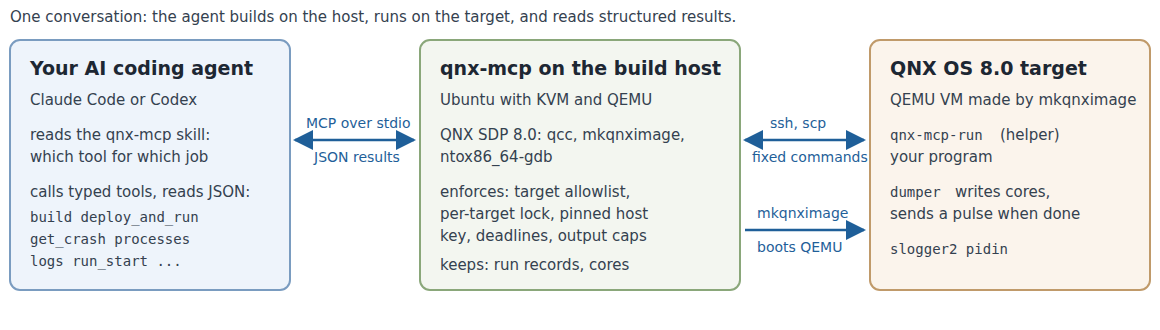
An AI coding agent is good at reading and writing C, but on its own it cannot see a QNX system. In this codelab you give it one. You connect your agent (Claude Code, or Codex as an alternative) to qnx-mcp, a Model Context Protocol (MCP) server that runs on your Ubuntu machine next to the QNX Software Development Platform (SDP) 8.0. The server gives the agent typed tools for a QNX OS 8.0 virtual machine: create it, build for it, run programs on it, and read what happened as structured data.
What you will do:
- Install qnx-mcp and check your machine with it
- Connect your agent and give it a short skill file that says which tool to use when
- Let the agent create a QNX OS 8.0 target in QEMU
- Break a build on purpose and read the compiler errors as data
- Run a sensor program that crashes, and get the source-level backtrace from its core file
- Fix it, rebuild and check the result on the target
- Run it as a background service, read its output and its slog2 log
- Find a deadlock from QNX thread states (SEND, RECEIVE, REPLY, MUTEX) and fix it
- See what the server refuses to do, and clean up
What you will learn about QNX: how dumper writes core files and notifies a waiting process with a pulse, what the thread states that pidin shows mean for message passing, and where QNX programs log to.
Everything in this codelab was run as written on Ubuntu 22.04 with QNX SDP 8.0 and Claude Code. The outputs are real, from that run, and trimmed: fields that do not matter here are left out, long strings end in ..., and paths in your home directory start with ~. Your ids, addresses and times will differ, and your agent will word its answers differently.
You need:
- QNX SDP 8.0 with a free non-commercial licence. If you do not have one yet, follow the QNX codelab Get a Free Non-Commercial QNX 8.0 License, then install QNX SDP 8.0 with the QNX Software Center. This codelab assumes it is installed in
~/qnx800(the Software Center default), so that~/qnx800/qnxsdp-env.shexists. - Ubuntu (22.04 or later, x86_64) with KVM and QEMU. Your user must be able to use
/dev/kvm, and the default libvirt network must be up, because mkqnximage targets get their address from it:
Log out and in again aftersudo apt install qemu-system-x86 libvirt-daemon-system bridge-utils python3-venv git openssh-client sudo adduser $USER kvm sudo adduser $USER libvirtadduser. Then check the network and let mkqnximage's own script allow QEMU to use libvirt'svirbr0bridge:virsh -c qemu:///system net-list ~/qnx800/host/common/mkqnximage/qemu/check-netvirshshould listdefaultasactive.check-netprints nothing when QEMU may already usevirbr0; otherwise it asks once for your sudo password to makeqemu-bridge-helpersetuid root and addallow virbr0to QEMU'sbridge.conf. - Python 3.10 or later (
python3 --version). - An SSH key without a passphrase at
~/.ssh/id_ed25519. qnx-mcp installs its public half into the target image. If you have none:ssh-keygen -t ed25519 -N '' -f ~/.ssh/id_ed25519. - An AI coding agent: Claude Code (used in this codelab) or Codex CLI.
Everything this codelab creates lives under one directory, so you can remove it in one step at the end. Open a terminal and keep it open for the whole codelab.
- Create the directory, get qnx-mcp and install it into its own Python environment:
export CODELAB=$HOME/qnx-codelab mkdir -p $CODELAB && cd $CODELAB git clone https://github.com/NikhilGogu/qnx-mcp.git python3 -m venv $CODELAB/venv $CODELAB/venv/bin/pip install --quiet ./qnx-mcp - Copy the example programs into a work directory. This is where the agent will work:
You should seecp -r $CODELAB/qnx-mcp/codelab/examples $CODELAB/work ls $CODELAB/workhubandsensor. - Tell qnx-mcp which targets it may touch and where to keep its files, and run its environment check:
export QNX_MCP_ALLOW_TARGETS=cl1
export QNX_MCP_TARGETS_DIR=$CODELAB/targets
export QNX_MCP_STATE_DIR=$CODELAB/state
export QNX_MCP_WORKSPACE=$CODELAB/work
$CODELAB/venv/bin/qnx-mcp --check
--check runs the same environment_check that the agent can call as a tool. Every line should start with ok:
ok    qnx_sdp                   QNX_HOST=~/qnx800/host/linux/x86_64 QNX_TARGET=~/qnx800/target/qnx
ok    tool:qcc                  ~/qnx800/host/linux/x86_64/usr/bin/qcc
ok    tool:mkqnximage           ~/qnx800/host/common/bin/mkqnximage
ok    tool:ntox86_64-gdb        ~/qnx800/host/linux/x86_64/usr/bin/ntox86_64-gdb
ok    tool:ntoaarch64-gdb       ~/qnx800/host/linux/x86_64/usr/bin/ntoaarch64-gdb
ok    tool:cmake                /usr/bin/cmake
ok    kvm                       /dev/kvm writable
ok    tool:qemu-system-x86_64   /usr/bin/qemu-system-x86_64
ok    tool:ssh                  /usr/bin/ssh
ok    tool:scp                  /usr/bin/scp
ok    ssh_key                   ~/.ssh/id_ed25519.pub
ok    dhcp_leases               /var/lib/libvirt/dnsmasq/virbr0.status
ok    allowlist                 QNX_MCP_ALLOW_TARGETS=cl1
ok    targets_dir               ~/qnx-codelab/targets
ok    workspace                 ~/qnx-codelab/work
environment_check: ok
Each failed check prints a fix: line. A warn line is optional (for example cmake, needed only for CMake projects). If your SDP is not in ~/qnx800, also set QNX_MCP_SDP_ENV to the path of your qnxsdp-env.sh.
What the four variables do:
QNX_MCP_ALLOW_TARGETS: the only target names the server accepts. Without it, it refuses every target.QNX_MCP_TARGETS_DIR: one mkqnximage directory per target.QNX_MCP_STATE_DIR: run records, core files, pinned SSH host keys (private to your user).QNX_MCP_WORKSPACE: host paths the agent may pass to the tools (sources, binaries, files to copy).
Your agent starts the server itself, as a child process that speaks MCP over stdin and stdout. You register it once, with the same four settings.
Claude Code
- From the work directory, register the server and check that Claude Code can start it:
The last line ofcd $CODELAB/work claude mcp add qnx \ -e QNX_MCP_ALLOW_TARGETS=cl1 \ -e QNX_MCP_TARGETS_DIR=$CODELAB/targets \ -e QNX_MCP_STATE_DIR=$CODELAB/state \ -e QNX_MCP_WORKSPACE=$CODELAB/work \ -- $CODELAB/venv/bin/qnx-mcp claude mcp listclaude mcp listshould end withConnected:qnx: ~/qnx-codelab/venv/bin/qnx-mcp - ✔ Connected - Install the qnx-mcp skill. A skill is a Markdown file that the agent sees by its name and description and loads when it decides a task needs it; this one says which qnx-mcp tool to use for which job and what the QNX thread states mean. It follows the same Agent Skills format as QNX's qnx-agent-skills. In our runs Claude Code listed the skill, but the agent never loaded it: the tool descriptions were enough for the tasks in this codelab. Copy it into the work directory:
mkdir -p .claude/skills cp -r $CODELAB/qnx-mcp/skills/qnx-mcp .claude/skills/ - Start Claude Code in the work directory:
Claude Code asks before each tool call. For this codelab you can answer "Yes, and don't ask again" for theclaudeqnxtools.
Codex CLI (alternative)
Add the server to Codex's configuration with the same settings and a longer tool timeout (creating a target takes longer than Codex's default of 60 seconds). The heredoc fills in your paths:
cd $CODELAB/work
mkdir -p ~/.codex
cat >> ~/.codex/config.toml <<EOF
[mcp_servers.qnx]
command = "$CODELAB/venv/bin/qnx-mcp"
tool_timeout_sec = 600
env = { QNX_MCP_ALLOW_TARGETS = "cl1", QNX_MCP_TARGETS_DIR = "$CODELAB/targets", QNX_MCP_STATE_DIR = "$CODELAB/state", QNX_MCP_WORKSPACE = "$CODELAB/work" }
EOF
codex mcp list
mkdir -p ~/.codex/skills && cp -r $CODELAB/qnx-mcp/skills/qnx-mcp ~/.codex/skills/
codex
codex mcp list should show qnx as enabled. This configuration was checked with codex mcp list (Codex CLI 0.160.0); the full run of this codelab used Claude Code. When you are done, delete the [mcp_servers.qnx] lines from ~/.codex/config.toml and remove ~/.codex/skills/qnx-mcp.
Check
Type this prompt into your agent:
What qnx tools do you have? Run environment_check and tell me if anything needs fixing.
The agent should list 17 tools (target_create, build, deploy_and_run, get_crash, processes, logs and so on), call environment_check and report that every required check passes.
Ask the agent:
Create a QNX target named cl1 and show me its status.
The agent calls target_create. qnx-mcp runs mkqnximage, QNX's script for building development images, in $CODELAB/targets/cl1, boots the image headless in QEMU with KVM, and waits until root SSH works. With KVM the whole step took 25 seconds in our run:
target_create(name="cl1")
{
 "ok": true,
 "name": "cl1",
 "state": "running",
 "arch": "x86_64",
 "ram": "1G",
 "cpus": 2,
 "ip": "192.168.122.65",
 "ssh": "ok",
 "uname": "QNX noname 8.0.0 2026/06/05-16:26:03EDT x86pc x86_64",
 "host_key_policy": "image",
 "dumper_running": true,
 "dumper_args": "dumper -U 30:30 -d /data/var/dumper -M 1000 -D cores -n",
 "core_naming": "sequential"
}
What you just got:
- A QNX OS 8.0 x86_64 virtual machine (
unamein the output) with 1 GB of RAM and 2 CPUs, on libvirt'svirbr0network. host_key_policy: "image": mkqnximage generated the target's SSH host keys on your machine, and qnx-mcp pinned them. If another machine ever answers at that address, the tools refuse to talk to it.dumper_running: truewith-n: dumper, the QNX service that writes core files for crashing programs, is running with sequential core names, so two crashes of the same program do not overwrite each other.
Check: target_list and target_status (ask the agent) show cl1 as running; ls $CODELAB/targets shows cl1.
The sensor program ($CODELAB/work/sensor/sensor.c) turns raw readings from an IMU and a barometer into calibrated values. Its Makefile links the slog2 logging library. Break it on purpose, in your terminal:
sed -i 's/cal->scale/cal->gain/' $CODELAB/work/sensor/sensor.c
Then ask the agent:
Build sensor/ for QNX and show me the compiler diagnostics. Do not fix anything yet.
The agent calls build on the directory. The server sees the Makefile, runs make with the SDP's qcc for x86_64, and returns the errors as objects instead of a wall of text:
build(path="~/qnx-codelab/work/sensor", system="make")
{
 "ok": false,
 "system": "make",
 "arch": "x86_64",
 "error_count": 2,
 "warning_count": 1,
 "diagnostics": [
  {
   "file": "~/qnx-codelab/work/sensor/sensor.c",
   "line": 71,
   "column": 15,
   "severity": "error",
   "message": "'const struct calibration' has no member named 'gain'",
   "option": null
  },
  {
   "file": "~/qnx-codelab/work/sensor/sensor.c",
   "line": 72,
   "column": 1,
   "severity": "warning",
   "message": "control reaches end of non-void function",
   "option": "-Wreturn-type"
  },
  {
   "file": null,
   "line": null,
   "column": null,
   "severity": "error",
   "message": "make: *** [<builtin>: sensor] Error 1",
   "option": null
  }
 ],
 "error": {
  "code": "build_failed",
  "hint": "Fix the diagnostics (file/line/column) and call build again."
 }
}
Each diagnostic has a file, line, column, severity and, for warnings, the option that enables it. The warning on line 72 is a consequence of the error on line 71, which is why agents (and people) fix the first error first.
Now ask:
Fix only the compile error and build again.
Your agent may mention other problems it noticed in sensor.c (ours did in every run) and offer to fix them. Leave them for now: the next step runs the program as it is.
Check: the build succeeds and returns one artifact, an x86_64 QNX executable with debug information and a GNU build ID:
build(path="~/qnx-codelab/work/sensor", system="make")
{
 "ok": true,
 "error_count": 0,
 "warning_count": 0,
 "artifacts": [
  {
   "path": "~/qnx-codelab/work/sensor/sensor",
   "arch": "x86_64",
   "type": "shared-object-or-pie",
   "interpreter": "/usr/lib/ldqnx-64.so.2",
   "qnx": true,
   "debug_info": true,
   "build_id": "213027f1047720ef8291093a742b7fbd",
   "size": 19096
  }
 ]
}
The sensor program reads its input from a file, and deploy_and_run copies only the executable to the target, so the data file has to go first. Ask the agent:
Copy sensor/samples.csv to /tmp/sensor/samples.csv on cl1, then run sensor/sensor on cl1
with that path as its only argument. If it crashes, find the root cause and explain it.
Do not change the code yet.
What the agent does
First, file_put copies the file and verifies its size and SHA-256 on the target. Then deploy_and_run copies the binary, runs it with a deadline, and reports how it ended. A crash is not an error for the tool, it is the observation:
file_put(target="cl1", local_path="~/qnx-codelab/work/sensor/samples.csv", remote_path="/tmp/sensor/samples.csv")
{
 "ok": true,
 "remote_path": "/tmp/sensor/samples.csv",
 "size": 376,
 "sha256": "ba450fa122efcbdc8569f2a78e160f467fc773e05b7955ce78667e9feeb466b5",
 "mode": "0644"
}
deploy_and_run(target="cl1", binary="~/qnx-codelab/work/sensor/sensor", args=["/tmp/sensor/samples.csv"])
{
 "ok": true,
 "run_id": "r-40b15d6dfd50",
 "outcome": "crashed",
 "signal_name": "SIGSEGV",
 "pid": 1269782,
 "duration_ms": 60,
 "stdout": "",
 "dumper": "notified",
 "core_ready_ms": 0,
 "dumper_core_path": "/data/var/dumper/sensor.1.core",
 "core_path": "/tmp/qnx-mcp/runs/r-40b15d6dfd50/sensor.1.core",
 "group_clean": true,
 "next_step": "call get_crash with target='cl1' and run_id='r-40b15d6dfd50' for a source-level backtrace"
}
Finally, get_crash with that run_id downloads the core file, checks that it belongs to exactly the binary that was deployed (provenance), and opens it with the SDP's ntox86_64-gdb:
get_crash(target="cl1", run_id="r-40b15d6dfd50")
{
 "ok": true,
 "summary": "SIGSEGV (SEGV_MAPERR (address not mapped)) at fault address 0x8 in calibrate at sensor.c:71; stack: calibrate() <- process_line() <- read_file() <- main()",
 "fault_address": "0x8",
 "faulting_instruction": "=> 0x504b66fe34 <calibrate+15>:\tmovsd  0x8(%rax),%xmm1",
 "faulting_thread_id": "1",
 "frames": [
  {
   "level": 0,
   "function": "calibrate",
   "file": "sensor.c",
   "line": 71,
   "locals": [{"name": "cal", "value": "0x0"}, {"name": "raw", "value": "31"}]
  },
  {
   "level": 1,
   "function": "process_line",
   "file": "sensor.c",
   "line": 84,
   "locals": [
    {"name": "line", "value": "0x24b12559e0 \"gyro_z,31\\n\""},
    {"name": "line_no", "value": "7"},
    {"name": "value", "value": "0x24b12559c0"},
    {"name": "channel", "value": null},
    {"name": "raw", "value": "31"},
    {"name": "cal", "value": "0x0"}
   ]
  },
  {"level": 2, "function": "read_file", "file": "sensor.c", "line": 105},
  {"level": 3, "function": "main", "file": "sensor.c", "line": 145}
 ],
 "provenance": {
  "core_executable": "/tmp/qnx-mcp/apps/1ca55f384ada262b/sensor",
  "core_pid": 1269782,
  "core_build_id": "213027f1047720ef8291093a742b7fbd",
  "binary_build_id": "213027f1047720ef8291093a742b7fbd",
  "executable_match": true,
  "pid_match": true,
  "build_id_match": true,
  "verified": true
 }
}
Reading the backtrace
- The fault is in
calibrate()atsensor.c:71, called fromprocess_line()andread_file(). calis0x0and the fault address is0x8: the program read the field at offset 8 of a NULLstruct calibration *, which isscale(the pointerchanneltakes the first 8 bytes).- In the caller's frame,
lineis"gyro_z,31\n"atline_no7 (channelshowsnullbecause gdb does not print arrays in this mode; it holdsgyro_z). That is a valid reading of a channel that is in the table, so the lookup failed for a name it should have found. find_calibration()usesbsearch(), which only works on a table sorted by the search key, and the table listsgyro_zbeforebaro. On QNX's C library the search forgyro_zends without finding it.
The input is fine and the table has every channel. Reading the source can make you suspicious: in each of our runs the agent noticed the unsorted table while it fixed the build, but it could not say which lookups would fail (twice it guessed baro). The core file shows what did happen, because the locals of every frame are in it: this run crashed on line 7 of the input, the first gyro_z reading.
Check: the agent names the unsorted table and bsearch() as the root cause, and the missing NULL check as the reason it crashes instead of failing cleanly. Compare its details with the bullets above: in two of our runs it got one wrong, once which field is at offset 8 and once the sort order of the channel names.
Ask the agent:
Fix the root cause, and also make an unknown channel a logged warning instead of a crash.
Rebuild and run it again on cl1.
The agent edits sensor.c, calls build and deploy_and_run again:
deploy_and_run(target="cl1", binary="~/qnx-codelab/work/sensor/sensor", args=["/tmp/sensor/samples.csv"])
{
 "ok": true,
 "run_id": "r-554bb066334a",
 "outcome": "exited",
 "exit_code": 0,
 "duration_ms": 25,
 "stdout": "channel  readings   average  unit\naccel_x         4      0.01  m/s2\naccel_y         4      0.00  m/s2\naccel_z         4      9.81  m/s2\nbaro            4   1013.23  hPa\ngyro_z          4      2.69  rad/s\n20 readings from 23 lines\n",
 "stderr": ""
}
Check:
outcomeisexitedwithexit_code0, and the last line says20 readings from 23 lines: every reading is used. If it says 16, the program now skips thegyro_zlines instead of crashing on them, and the lookup is still broken; ask the agent to fix the lookup too.- See what the agent changed:
diff -u $CODELAB/qnx-mcp/codelab/examples/sensor/sensor.c $CODELAB/work/sensor/sensor.c
A service does not end on its own, so deploy_and_run would only wait for its deadline. qnx-mcp has three tools for this: run_start starts the program in the background and returns at once, run_poll reads new output from byte offsets, and run_stop ends it. In follow mode (-f) the sensor program replays the file forever, one reading every 200 ms. Ask the agent:
Start sensor in follow mode (-f /tmp/sensor/samples.csv) in the background on cl1. Show
me its first readings, then wait a few seconds and show me only the readings that are
new since then. Leave it running.
The agent calls run_start, then run_poll twice. The second call passes the first call's stdout_next as stdout_offset, so it returns only the new lines. wait_s makes run_poll wait for new output, up to that many seconds; it returns as soon as some has arrived, so it rarely waits the full time:
run_start(target="cl1", binary="~/qnx-codelab/work/sensor/sensor", args=["-f", "/tmp/sensor/samples.csv"])
{
 "ok": true,
 "run_id": "r-86a5f3581259",
 "state": "running",
 "pid": 1826839,
 "remote_path": "/tmp/qnx-mcp/apps/ddb8e1a4ed0472f2/sensor",
 "deadline_s": 600
}
run_poll(target="cl1", run_id="r-86a5f3581259", wait_s=1)
{
 "ok": true,
 "state": "running",
 "alive": true,
 "stdout_offset": 0,
 "stdout": "accel_x       0.02 m/s2\naccel_y       0.02 m/s2\naccel_z       9.81 m/s2\ngyro_z        0.54 rad/s\n...",
 "stdout_next": 312
}
run_poll(target="cl1", run_id="r-86a5f3581259", stdout_offset=312, stderr_offset=0, wait_s=5)
{
 "ok": true,
 "state": "running",
 "alive": true,
 "stdout_offset": 312,
 "stdout": "gyro_z       -0.70 rad/s\nbaro       1013.25 hPa\naccel_x      -0.01 m/s2\naccel_y      -0.01 m/s2\n...",
 "stdout_next": 528
}
Check: the second poll starts where the first one ended (its stdout_offset equals the first stdout_next), and state is still running.
On QNX, system services and most programs log to slog2 rather than to files: a program registers a buffer set in shared memory with slog2_register() and writes entries with slog2f(), the slogger2 service manages the buffers, and slog2info reads them. The sensor program logs one warning for every implausible reading. Ask the agent:
What warnings has the sensor service logged to slog2 in the last minute? Then stop the
service.
The agent calls logs with a process name, a minimum severity and a time window, then run_stop:
logs(target="cl1", process="sensor", since_s=60, min_severity="warning")
{
 "ok": true,
 "total_entries": 988,
 "matched": 4,
 "returned": 4,
 "entries": [
  {
   "time_iso": "2026-11-03T17:42:39.151Z",
   "process": "sensor",
   "pid": 1826839,
   "buffer": "readings",
   "severity_name": "warning",
   "message": "line 12: gyro_z reading 10.71 rad/s is outside +/-8.70"
  },
  {
   "time_iso": "2026-11-03T17:42:43.171Z",
   "process": "sensor",
   "pid": 1826839,
   "buffer": "readings",
   "severity_name": "warning",
   "message": "line 12: gyro_z reading 10.71 rad/s is outside +/-8.70"
  }
 ]
}
(two of the four entries shown)
run_stop(target="cl1", run_id="r-86a5f3581259")
{
 "ok": true,
 "was_running": true,
 "acknowledged": true,
 "state": "finished",
 "outcome": "stopped",
 "result": {
  "signal_name": "SIGKILL",
  "runner_stopped_by": "SIGTERM",
  "duration_ms": 15792,
  "group_clean": true
 }
}
Check: the warnings say line 12: gyro_z reading 10.71 rad/s is outside +/-8.70, one per pass through the file, and run_stop returns outcome: "stopped".
$CODELAB/work/hub/hub.c is a sensor hub in one process with three threads: a sampler refreshes a table of readings and publishes each new table to a server thread over a QNX channel; a display thread asks the server for the latest table every 30 ms and prints it. Ask the agent:
Build hub/ and start it in the background on cl1. It should print a "table" line every
few tens of milliseconds. Check whether it does. If it is stuck, find out why from the
thread states, explain it, and stop it. Do not change the code yet.
The agent builds, calls run_start and run_poll (the hub printed its first line, which names its threads, and then nothing), then processes with include_threads=true:
run_poll(target="cl1", run_id="r-780d355db0fd", wait_s=3)
{
 "ok": true,
 "state": "running",
 "alive": true,
 "stdout": "hub: pid 2347031, server thread 2, sampler thread 3, display thread 4\n",
 "stdout_next": 70
}
processes(target="cl1", pid=2347031, include_threads=true)
{
 "ok": true,
 "pid": 2347031,
 "name": "hub",
 "threads": [
  {"tid": 1, "state": "JOIN", "blocked_on": "2"},
  {"tid": 2, "state": "MUTEX", "blocked_on": "(0x5b069a1008) 2347031-03 #0"},
  {"tid": 3, "state": "SEND", "blocked_on": "2347031"},
  {"tid": 4, "state": "REPLY", "blocked_on": "2347031"}
 ],
 "thread_states": {"JOIN": 1, "MUTEX": 1, "SEND": 1, "REPLY": 1}
}
What the states mean
State | Meaning on QNX |
| |
RECEIVE | A server thread waits in | the channel id | |
SEND | A client called | the server's pid | |
REPLY | The server has received the message but not replied yet. | the server's pid | |
MUTEX | Waits for a mutex that another thread holds. | the mutex address and its owner as | |
JOIN | Waits in | that thread's id | |
NANOSLEEP | Sleeps, for example in | ||
Each thread also has a priority and a scheduling policy (10 and round robin for all four here; left out above).
Follow the chain. The display thread (4) is REPLY-blocked: the server took its request and has not answered. The server thread (2) is MUTEX-blocked on the table lock, whose owner is ...-03, thread 3. Thread 3, the sampler, is SEND-blocked: it is sending its new table to the server while it holds the lock, and the only thread that receives on that channel is thread 2, which waits for the lock. That is a cycle, a deadlock. The rule it breaks: never hold a mutex across a blocking MsgSend().
Now ask:
Fix the deadlock, rebuild, start hub again in the background and show me its thread
states. Then stop it.
Check: the new thread states show the server thread in RECEIVE (idle, waiting for the next request) and the sampler and display threads in NANOSLEEP between their work, and run_poll shows table lines:
run_poll(target="cl1", run_id="r-e24670987cf7", wait_s=3)
{
 "ok": true,
 "state": "running",
 "stdout": "hub: pid 2977815, server thread 2, sampler thread 3, display thread 4\ntable 0: 0 0 0 0\ntable 1: 101 201 301 401\ntable 1: 101 201 301 401\n...",
 "stdout_next": 1688
}
processes(target="cl1", pid=2977815, include_threads=true)
{
 "ok": true,
 "pid": 2977815,
 "name": "hub",
 "threads": [
  {"tid": 1, "state": "JOIN", "blocked_on": "2"},
  {"tid": 2, "state": "RECEIVE", "blocked_on": "1"},
  {"tid": 3, "state": "NANOSLEEP", "blocked_on": null},
  {"tid": 4, "state": "NANOSLEEP", "blocked_on": null}
 ],
 "thread_states": {"JOIN": 1, "RECEIVE": 1, "NANOSLEEP": 2}
}
The server enforces its limits itself; the tool descriptions only explain them. Try two things. First, a target outside the allowlist:
Create a second target named lab2.
target_create(name="lab2")
{
 "ok": false,
 "error": {
  "code": "target_not_allowed",
  "message": "target 'lab2' is outside this server's allowlist ['cl1']",
  "hint": "Use one of the allowed target names (QNX_MCP_ALLOW_TARGETS); other targets belong to someone else."
 }
}
The agent cannot change QNX_MCP_ALLOW_TARGETS: you set it when you registered the server, outside the conversation.
Second, arguments are an array that is passed to the program as it is, never to a shell. Ask:
This is a test of argument passing. Run sensor/sensor on cl1 with exactly one argument,
the string "/tmp/sensor/samples.csv; reboot", and show me its stderr. Then show me the
target status.
deploy_and_run(target="cl1", binary="~/qnx-codelab/work/sensor/sensor", args=["/tmp/sensor/samples.csv; reboot"])
{
 "ok": true,
 "outcome": "exited",
 "args": ["/tmp/sensor/samples.csv; reboot"],
 "exit_code": 1,
 "stdout": "",
 "stderr": "/tmp/sensor/samples.csv; reboot: No such file or directory\n"
}
target_status(name="cl1")
{"ok": true, "name": "cl1", "state": "running", "ssh": "ok", "qemu_pid": 314985}
The program received one argument containing ; and a space, tried to open a file with that name, and the target is still running.
Why there is no "run a shell command" tool: a shell tool would make every other limit (allowlist, path checks, deadlines, output caps, verified core files) optional for an agent that has been talked into misusing it, for example by text planted in a log file it reads. With typed tools the server can check each argument. Your agent's own shell is a separate matter: keep its permission prompts on.
Ask the agent:
Destroy target cl1.
The agent calls target_destroy; confirm must repeat the name:
target_destroy(name="cl1", confirm="cl1")
{
 "ok": true,
 "name": "cl1",
 "destroyed": true,
 "was_running": true,
 "detail": "stopped QEMU, removed ~/qnx-codelab/targets/cl1"
}
Then leave the agent and remove everything in your terminal:
cd $CODELAB/work && claude mcp remove qnx
cd ~ && rm -rf $CODELAB
Check: ls ~/qnx-codelab reports that it does not exist, and this prints nothing:
for p in $(pgrep qemu-system); do echo "$p $(readlink /proc/$p/cwd)"; done | grep qnx-codelab
mkqnximage starts QEMU in the target's directory and passes it only relative paths, so the working directory, not the command line, shows which QEMU belongs to this codelab. A line here is a QEMU process from this codelab that is still running (its directory shows as (deleted)); end it with kill and the process id at the start of the line.
You gave an agent a QNX target and used it the way a QNX developer would: dumper cores for crashes, thread states for hangs, slog2 for logs.
- Your own project: point
QNX_MCP_WORKSPACEand the agent at it.buildhandles make, CMake (it writes a QNX toolchain file) and plain sources withqcc. - More tools:
file_getcopies files back from the target;target_stopandtarget_startkeep a target between sessions;get_crashalso takes acore_pathand the exact binary for cores that qnx-mcp did not produce. - Porting packages: the QNX codelab Set up the QNX agent-skills repository gives an agent QNX porting knowledge; qnx-mcp gives it the tools to try things on a target.
- QNX documentation: dumper, pidin, slog2info and message passing.
qnx-mcp, its design notes and its test logs are at github.com/NikhilGogu/qnx-mcp. Report problems with this codelab there.